
TV Studios: Simple Ways to Think About RGBW Background Color with AQUAPEARL-PRO II
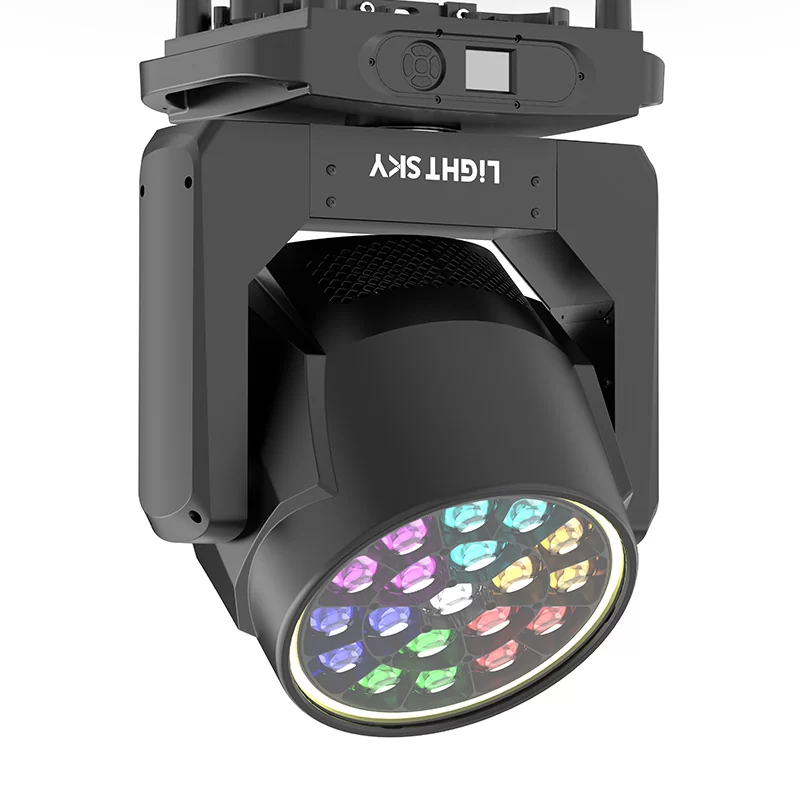
TV studio background lighting needs to support cameras, set design, presenters, and changing scenes without making color management unnecessarily complicated. RGBW fixtures provide a practical way to build different background tones while retaining control over intensity and movement. At LiGHT SKY, we approach the AQUAPEARL-PRO II as a fixture that combines RGBW color mixing, beam and wash functions, zoom control, and independent LED control, giving production teams several ways to organize background color.
Start with the Difference Between RGB and RGBW
RGB fixtures create colors by combining red, green, and blue output. RGBW adds a dedicated white LED source, giving lighting programmers another channel for balancing color and brightness. For television, this distinction matters because a background does not always need a highly saturated color.
A softer white-based tone can provide a different visual relationship with the foreground subject than a strongly mixed RGB color. The useful approach is to decide whether the background should support separation, atmosphere, or visual continuity before selecting the exact color values.
With an LED wash moving head, the lighting team can also consider coverage rather than treating every fixture as a single fixed-color source. The AQUAPEARL-PRO II uses a uniform RGBW color mixing system and provides a 2500K–10000K color-temperature range, according to its published specifications.
Think About Background Color as a Layer
A TV set usually contains several visual elements, so background color should be considered as one layer within the complete lighting arrangement. A strong background color can change how neutral surfaces appear, while a restrained tone may leave more visual space for presenters, graphics, or set details.
This makes intensity an important part of color planning. Two fixtures using the same RGBW values can create different impressions when their output levels or coverage areas differ. Programming therefore benefits from considering hue and brightness together instead of treating color selection as an isolated task.
A moving head wash light can contribute to this layered approach because its zoom system allows the beam to move between narrower and wider coverage. The AQUAPEARL-PRO II specifies a 7°–45° zoom angle, while its beam angle is listed as 5°–25°.
Use Coverage to Define the Background Area
Background lighting becomes easier for us to manage when the intended coverage area is clearly defined. A wide wash can help cover a larger scenic surface, while a narrower output can concentrate attention on a particular part of the set. This allows us to adjust the relationship between the background and the main performance area according to the needs of each scene.
Zoom control is therefore useful not simply for creating different looks, but also for adjusting how much of the background receives the selected color. We can use this flexibility to organize lighting positions according to the physical dimensions of the studio rather than relying on one fixed beam spread.
The fixture’s pan and tilt movement also provide us with additional positioning flexibility. AQUAPEARL-PRO II has a 540° pan range and 218° tilt range, with 8-bit and 16-bit precision scanning options listed on its specification page. These movement capabilities can help us make more precise adjustments when different background areas or stage positions need to be covered.
Keep Color Changes Structured for Camera Work
For studio productions, we usually plan color changes around the sequence of the program. A background may require one color during the opening segment, a different tone during a transition, and a more neutral appearance for an interview or presentation. Structuring these changes around the production flow helps us maintain a consistent visual relationship between the background and the main content.
Instead of programming numerous unrelated effects, we can organize scenes around a limited set of repeatable color states. This approach makes cues easier for operators to understand and helps reduce unnecessary changes during production. It also gives the lighting team a clearer framework when adjusting the look of different segments.
We can create further variations through independent LED control. AQUAPEARL-PRO II allows each LED to be controlled independently, while its front luminous circle can also be controlled separately for dynamic color-changing effects. This gives us additional options for creating subtle background variations without changing the entire lighting setup.
Match Control Methods with Studio Workflow
A studio lighting system also needs to communicate with the existing control environment. AQUAPEARL-PRO II supports DMX512, RDM, Art-Net, and sACN, with multiple channel configurations available. This gives programmers several established control methods for integrating the fixture into different lighting workflows.
Dimming should also be considered alongside color. The fixture provides electronic dimming with four dimming curves, four dimming frequencies, and four dimming speeds. These options allow the programmer to consider how background brightness changes occur rather than only deciding which color is displayed.
Build a Practical RGBW Background Strategy
For TV studios, a useful RGBW strategy can begin with three questions: what part of the background needs coverage, how strong should the color appear on camera, and how often will the background change during the production? These questions provide a clearer starting point than selecting colors only for visual appeal.
We also need to consider whether the fixture will be used indoors, outdoors, or across different production environments. AQUAPEARL-PRO II carries an IP66 rating and is specified for an operating environment of -20°C to 45°C, giving production teams defined environmental parameters to consider when planning installations.
For studios using LiGHT SKY equipment, AQUAPEARL-PRO II brings these considerations together through RGBW mixing, beam-and-wash functionality, independent LED control, electronic zoom, movement, and multiple control protocols. Rather than treating background color as a single preset, we can use these functions to create a structured lighting system in which color, coverage, intensity, and scene changes work together.